How to Rank on Google Part 3

How to Rank on Google Part 3: Site HTML Markup

Laws 20-27 of 27 Laws of On Page SEO

You finally made it. You’ve optimized your content, and your site architecture. Isn’t that enough? Wouldn’t you say, that’s enough to appease the SEO Gods? Aren’t the crawlers satisfied with your effort? Well, no. They aren’t because now they need to take a look at your actual HTML code and see what is going on with your code. You see, the crawlers don’t see the beautiful text that you see here. What they are looking at is this: How_To_Rank_On_Google_Part_3_HTML_Markup
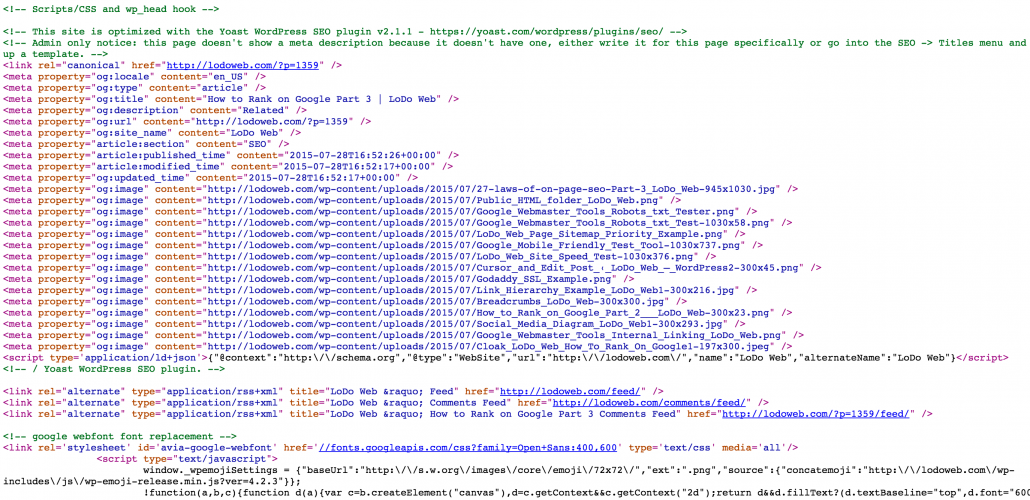
This ugly. Confusing. Organized mess we call code. This code is what the search engines see when they crawl your site. It is up to you to make it make sense for the search engines to understand. This last part of the 3 part series is perhaps the most technical, but do not worry, I’ll go over each line one by one so that you understand it, even if you don’t know how to code.

The last tutorial went over your site architecture. We learned how to structure your site so it makes sense to the crawlers and search engines, and also how to increase your site usability and functionality. As you should know by now, Google wants to see a hierarchical and coherent structure on your site. This is especially important for e-commerce. This time, we are diving into the code and the actual HTML markup. Take a deep breath. It’s going to be OK. Let’s dive right in.
27-laws-of-on-page-seo-Part-3_LoDo_Web

Part 3

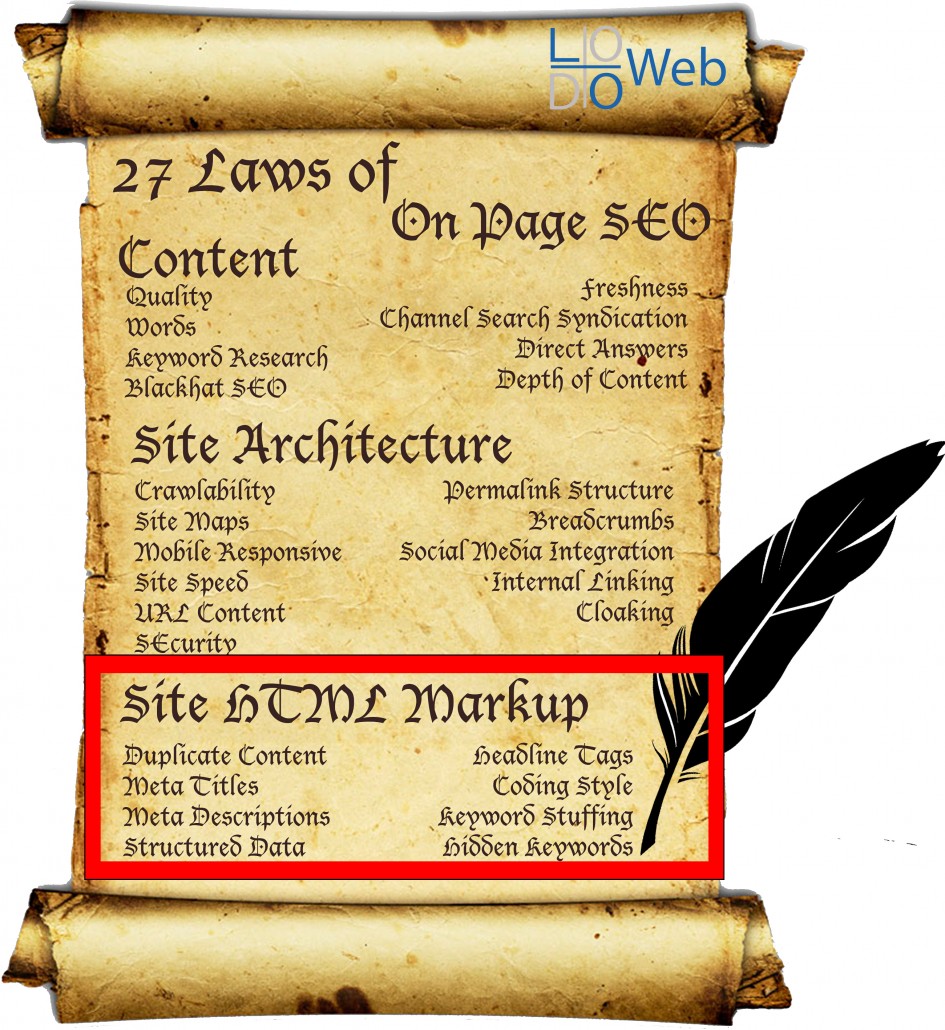
LAWS 20-27 – SITE HTML MARKUP

LAW 20: DUPLICATE CONTENT

I briefly talked about duplicate content in How to Rank on Google Part 1. Duplicate content can be a huge problem on the web and is to be avoided at all times. Unless you do it right. There are ways to present duplicate content in Google that gives the right attribution to the right source.
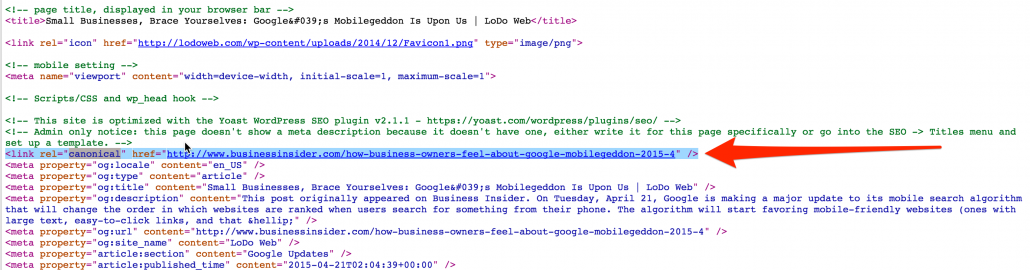
Canonical_Linking_Google_Duplicate_Content_Compliance_LoDo_WebThere is an appropriate way of providing duplicate content if you would like to do so. This is without any penalties. You can utilize something called canonical linking to attribute the content to the right author. Not only should you attribute the author in the title, but also do so in the code where Google bots can see it.

The code you must use:

<link rel=”canonical” href=”[ORIGINAL-SITE]” />
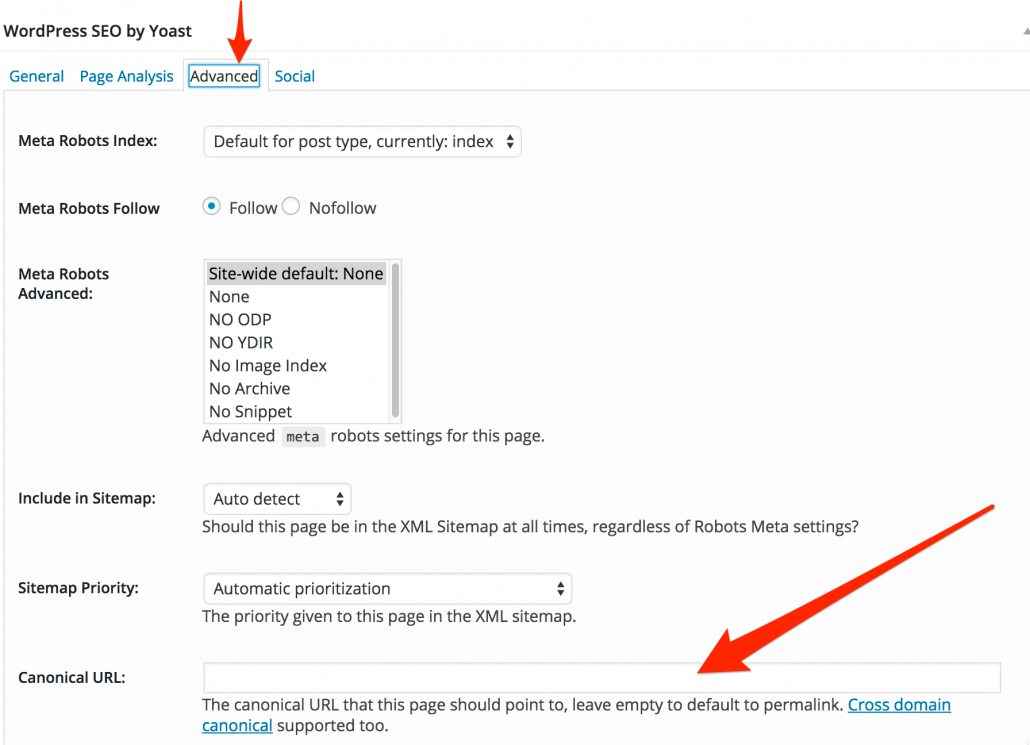
Yoast_SEO_Canonical_URL_Example_LoDo_WebThis code should  go above your tag on your website. If you are on WordPress and are using Yoast’s SEO plugin, you can navigate to the Advanced tab and the Canonical URL can be set there.

Replace “[ORIGINAL-SITE]” with the original site owner or author. Link directly back to the article to avoid any duplicate content penalties. This will tell Google that you didn’t create the article/site and your providing the right attribution to the original author. It’s all about the kudos here. Make sure you give people the attribution they deserve for writing an article and your using it. It’s common courtesy and will avoid any Panda violations. I’ll be going into more depth on duplicate content in the next chapter of our On Page SEO Tour.

LAW 21: META TITLES


Remember Meta Keywords? Who uses those anymore? More importantly, what search engine even pays attention to this anymore. The answer is none. No search engines pay attention to meta keywords, but meta titles…These little gems give you full control over how your content is published and appears in Google. They are closely tied to Meta Descriptions, which will be the next Law. Meta titles are the title of your page that exists in the code. This shows up in the SERP.

How_to_Rank_on_Google_Meta_Title_LoDo_Web

This title is must be reflected in the actual code of your page.

Meta-Titles-LoDo-Web

Meta titles allow the search engines to identify what your page is actually about and this is inserted below the tag of your site.

The Code:

<title>YOUR-META-TITLE</title>

Simply put, without forcing the rewrite of the titles on your page, the search engines will pull information from your site and essentially insert whatever they feel is best. Inserting your researched keyword into your meta title is the point of having control of the titles. The search engines need to know what keyword you are trying to rank on.

LAW 22: META DESCRIPTIONS


Like meta titles, meta descriptions are also in your control. You have 156 Characters to showcase what your page is about. If you go over, Google will simply insert ellipses and cut off the remainder of your description.

How_to_Rank_on_Google_Meta_Description_LoDo_Web

The Code:

<meta name=”description” content=”YOUR-DESCRIPTION” /> 

The code needs to be inserted below the tag of the page. Including the keyword you are trying to rank on in the Meta Description will help Google identify the target keyword of your post.

LoDo_Web_How-To-Rank-On-Google-27-Laws-Meta-Description

Remember to always include the researched keyword in your meta description.

LAW 23: STRUCTURED DATA

Structured data is simply put, the language of the search engines. What can they extract from your site and insert it alongside your SERP? Structured_Data_Example_LoDo_WebThis helps search engines clearly understand what your page is about and helps insert even more rich information in the SERP. This is most commonly called a “Rich Snippet”. Basically, it’s a search engine that can include rich information, like reviews, comments, ratings, or even specific data about that particular article. For example, if you own a company and have Google Reviews, you can insert these Google Reviews into your site and include them into your SERP. The most common one you see is those rating stars.
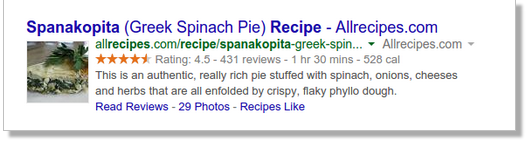
This helps users quickly decipher if they want to click on the page or not, based on the information provided in the SERP. How many times have you decided not to click on something because of reviews or something of that sort? This isn’t a direct ranking factor, but does help users with identifying whether or not they want to click on certain results versus others.

You can use Google’s Webmaster Tools platform to help highlight structured data on your site. Clearly this is something search engines are encouraging webmasters, both advanced and novice alike, to embrace.

LAW 24: HEADLINE TAGS
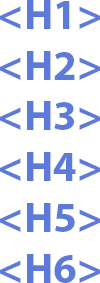

H-Tags-Headline-Tags-LoDo-WebEverybody has this in their SEO arsenal. SEO isn’t just about writing high quality content. It’s also abut using the right tags so search engines can quickly crawl the page and identify exactly what keywords are present. Every page has H1-6 tags at their disposal.

These tags are very easy to implement:

<h1>YOUR CONTENT HERE</h1>

You can use H1 through H6 tags and each one in between suggests a lower and lower keyword ranking option. The H1 tag carries the most weight and should have the selected keyword in your title. As you go further and further down to H6, the titles get more and more specific based on the broad keyword you are trying to rank on. Here you can use alternative keywords that are similar but different. In other words you can use synonyms to diversify what you are saying.

This helps content on two fronts. One, it helps you keep your own content organized. Two, it helps keep the code organized for the search engines. Think of it as a hierarchy of H Tags.

LAW 25: CODING STYLE


A clean and light coding style is important when ranking on Google. What is essentially meant by coding style is not to overcomplicate your code with needless HTML. The goal is to keep it light, yet still effective. This means not using the H Tags more than once in each page, and also keeping your use of HTML and Javascripts to a minimum. CSS loads faster and generally is the preferred way of handling text colors, sizes and other elements globally.

Overusing HTML styles and inserting them all over your page makes it very difficult for the search engines to crawl. Use CSS instead of HTML and affect your styling globally. Keep your HTML simple and clean without over using common HTML elements. Simply put, you want to have professional, clean code.

This is also reflective in the themes that you are using in WordPress. Some themes have notoriously heavier code and scripts than others, so you want to ensure that you are choosing something that has been vetted for SEO and ranking. Using a one-off theme with limited reviews can affect your SEO negatively because it just doesn’t load efficiently. Remember, crawlers won’t stay on a page too long, especially if it doesn’t load quickly.

Plugins also can overload your HTML and cause things to just not function properly on your site. Limit the use of plugins on your site so that it stays up to the correct code. Only use themes and plugins that are reputable and have a lot of reviews.

Overall, you want to use the new HTML5/CSS3 markup languages so that you have modern code. A lot has changed since the original HTML markup language has been released and it’s your job, as a developer, to stay up to code. Keeping light code, without too many scripts loading will keep your site up to standards.

LAW 26: KEYWORD STUFFING


Keyword-stuffing-lodowebBack in the days of easy SEO, you can simply stuff your keywords into your content and hope for the best. Search engines used to use meta keywords and crawl the content for the relevant keywords and voilà, you are on page 1. Those days are long gone and it is going to affect you very negatively if you repeat the same keyword over and over.

Instead of repeating the same keyword constantly, repeat the keyword in different forms using similar phrases. It sounds difficult, but comes back to a natural writing style. Using a natural writing style, you naturally will include like phrases into your content. Avoid stuffing at all costs and repeating non-relevant keywords in your copy. This will indicate that you are using stuffing techniques that will negatively affect your rank. Nowadays this is considered blackhat SEO and will not help you rank at all. Instead, it will most likely hurt your rank as the search engines are no longer searching for just keywords in your content.

LAW 27: HIDDEN KEYWORDS


hidden-keywords-lodoweb-how-to-rank-on-google-part-3Like cloaking, hidden keywords are not going to help you. Essentially this is like keyword stuffing, but either hiding the keywords in the HTML code or using a transparent color and hiding it on the page itself.

When throwing in a bunch of random keywords designed to fool the search engines, you’ll only end up fooling yourself. No matter how well you hide the keywords in your content or pages, whether it be in files, code, HTML, or CSS, will only impact you negatively as the search engines are a lot smarter than you. Google will know if your content is relevant to what the topic is of the page. This is considered a very blackhat technique and if you get caught using hidden keywords, either in your meta information or directly, you will eventually get caught and the rank you will receive will be temporary at best. You may get blacklisted at the worst.
Please comment below. How do you write your HTML markup so that it gets ranked on Google?

How to Rank on Google Part 2

How to Rank on Google Part 2

Laws 9-19 of 27 Laws of On Page SEO

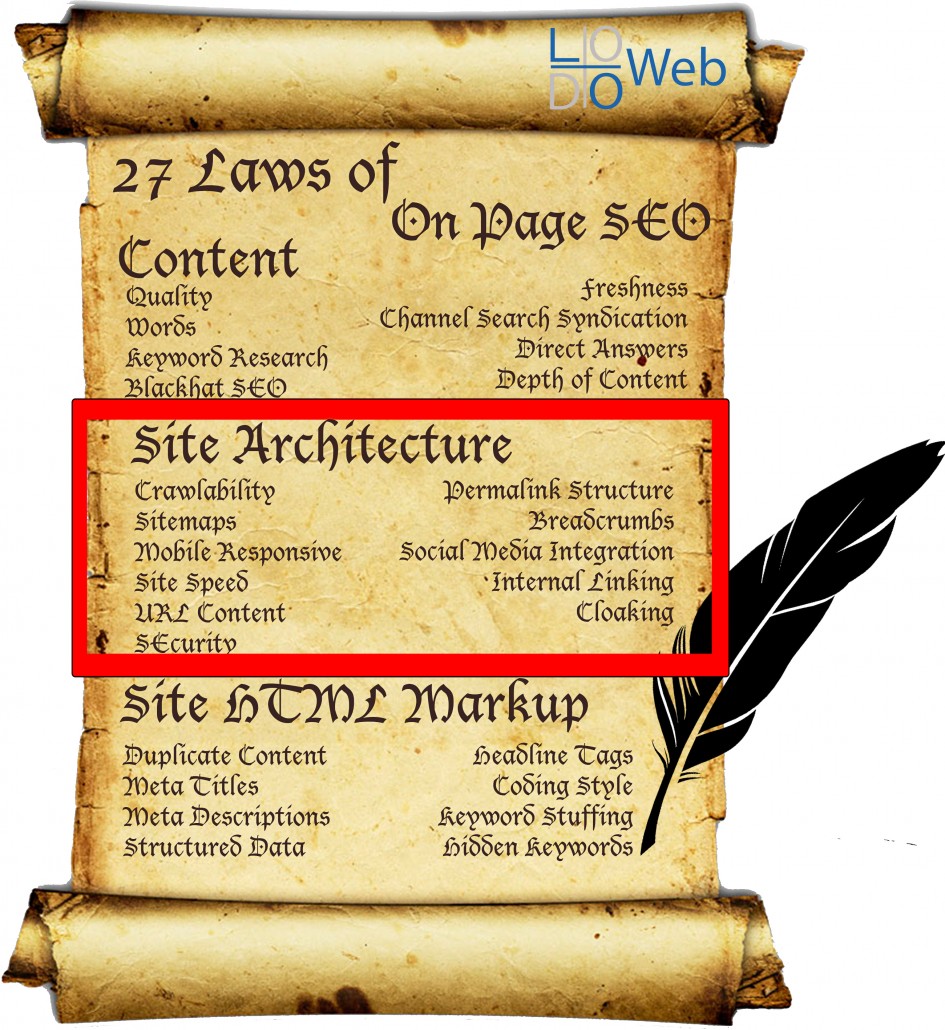
It seems more and more these days with the amount of web saturation out there that getting on page 1 rank on Google is the stuff of legend. Though it’s not the easiest thing to do when you have a fresh website, it is possible by following a strategy. The last tutorial went over those things in your control related to content. As we all know by now, Google wants to see fresh, new content. Though the adage content is king may hold true most of the time, it doesn’t necessarily stick when it comes to the technical aspects of SEO. You need more than just good quality content to get recognized by the search engines.

So you’ve created your high-quality, relevant and amazing content, now it’s time to see how we can place it in the best possible website orientation. If the website architecture is not optimized for SEO, it will be more difficult for your site to rank effectively. The goal here is to reduce as much SEO friction as possible so that the search engines have no problem identifying what your content is about.

27-laws-of-on-page-seo-Part-2_LoDo_Web

Part 2

LAWS 9-19 – SITE ARCHITECTURE

LAW 9: CRAWLABILITY

So what is crawlability and why is it so important? Crawlability determines how accessible your site is to the web crawlers. This is essentially notifying the World Wide Web that your site exists and that you are open to receive traffic. Site crawling is the first step in letting the search engines know you exist. If you are restricting crawlers in any way, they will turn around and go elsewhere. It’s imperative that you have an adequate robots.txt file that does not block any crawlers.

Click here to download a robots.txt file that does not block robots.

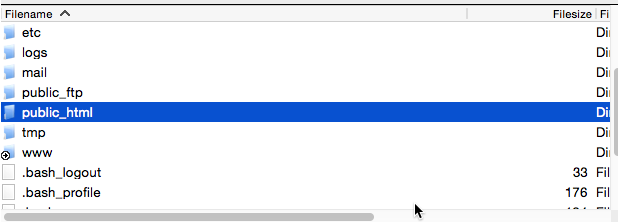
Public_HTML_folder_LoDo_WebUpload this to the ROOT of your server directory. This should be in the “public_html” folder. You’ll notice that this file is nearly blank. This is intentional. To see a different version, with some blocked content see LoDo Web’s robots.txt file that is uploaded to the root directory. What you block is your call, just remember not to block any root domains to prevent the robots from accessing your site as a whole.
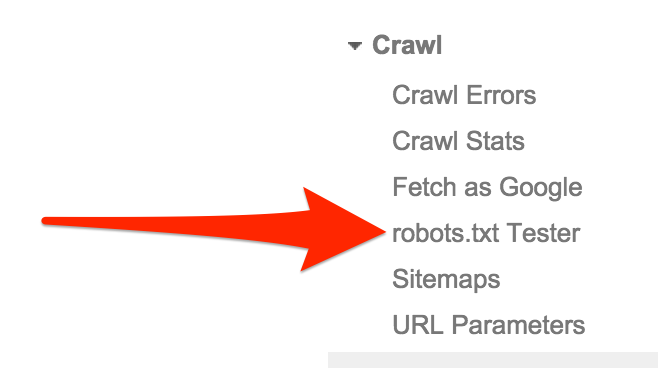
Google_Webmaster_Tools_Robots_txt_TesterAnother way is to setup up Google Webmaster Tools and do a robots test. This runs a quick test on your root domain, or any other domain you set it to. If your test comes out as “Allowed“, then your robots.txt clears the robots crawlability test.

Google_Webmaster_Tools_Robots_txt_Test

If your robots.txt clears Google’s tests, then you should be good. On the flip side, not letting the crawlers access certain pages or folders may be a great idea to limit the amount of information crawled. Remember, we are looking for efficient crawls. Disallowing certain folders and limiting the amount of information crawled will speed up the web crawler’s efficiency and reduce the amount of time it needs to spend there. Perfect.

The amount of time that the crawler may spend on your site is referred to as a Crawl Budget and each site has only a certain amount of crawl budget available. This is very important to consider if you have a large site. You want the right pages crawled. In other words, you want the most important pages on your site crawled first, and the rest to have a lower priority. Core files and plugins are not essential to be crawled and should be disallowed.

In general, your site shouldn’t cause any site crawl issues, especially if you are using WordPress. WordPress comes stock with a built in robots.txt file so you don’t even have to make one. However, if you have certain JavaScripts or Flash applications on your site, this can cause crawling issues.

LAW 10: SITEMAPS

What’s a sitemap? A sitemap is literally that, a map of your site. Consider it a blueprint designed for the crawlers to identify the important areas of your site. Sitemaps are usually in .xml format and are used by the robots that crawl your site. Can they be used by humans? Of course, you can access ours right here. This gives the outline of your site and allows visitors and robots alike to determine the page hierarchy.

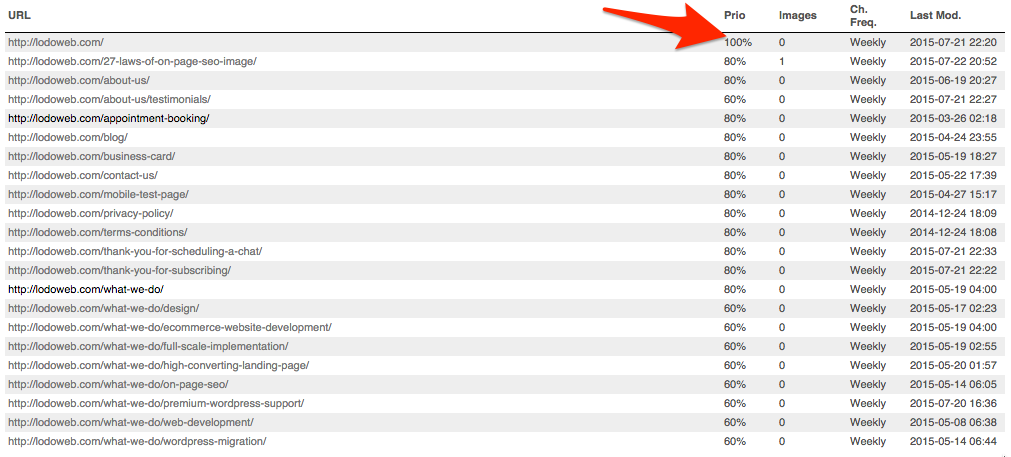
LoDo_Web_Page_Sitemap_Priority_ExampleWithout a sitemap, crawlers are effectively navigating your site without any guidance or maps. There is no way for them to know where they are on your site and what the index priority is of each page. This indicates hierarchy.
The page hierarchy indicates which page is the most important and which one will get indexed first with the crawler’s available resources. If you are using WordPress, create a sitemap using Yoast’s SEO Plugin. This automatically creates the sitemap.xml file for you, but includes everything. Make sure to configure it accordingly.

Page sitemaps are to be standard with all websites and gives crawlers the blueprint that they need to navigate your site. Without a sitemap, a crawler is like a ship without a rudder, aimlessly navigating until it uses up Crawl Budget and leaves

LAW 11: MOBILE RESPONSIVE

On April 21st Google released it’s mobile algorithm update. It’s official, Google now indexes the display of a site as part of its search algorithm. Being mobile responsive is of utmost importance as you will see your rank plumit compared to your competitors if they are mobile optimized and you are not. So what does it mean to be mobile optimized? Mobile optimization or responsive design means that your site will respond to any device that loads your site. It responds to fit the dimensions of that device in order to optimize browsing for all viewers.

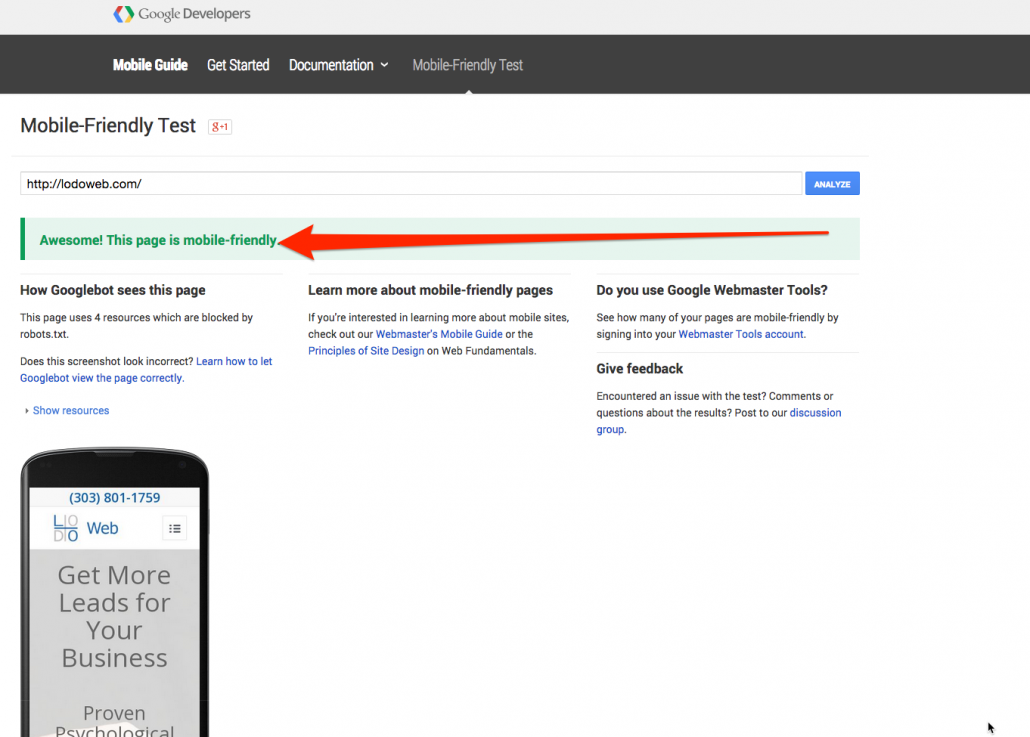
Google_Mobile_Friendly_Test_ToolGoogle has even taken the liberty of releasing a Mobile-Friendly Test tool. If you pass, you should see results like what you see on the left. This handy little test tool allows you to see if your site is mobile responsive and abides by Google’s algorithm updates. If it does, you’ll pass and you’ll also see a little “mobile friendly” signature next to your link when visiting the site on a mobile device.

What happens if you have a site that is dated and is not mobile friendly? Well, it will fail the test. If your competitors are mobile responsive and you are not, then Google will dish out higher rank to those competitors on the keywords they rank on, and therefore you will lose your position on the SERP. This is even if you have a high authority site. Without being mobile responsive, you risk being dethroned by those under you in rank.

How do you adapt an old site? The easiest answer, is to get onto a CMS like WordPress and build a new one. I know of a great company that can help you with this ;). Mobile responsive design is becoming yet another benchmark that Google is using to identify rank.

LAW 12: SITE SPEED

LoDo_Web_Site_Speed_TestIn accordance with responsive design, the page speed load time is also an important consideration for rank. The ages of 56K modems, where you were accustomed to wait about 30 seconds to load a flat HTML page, are gone. Thankfully. It should take seconds to load your site in Google.

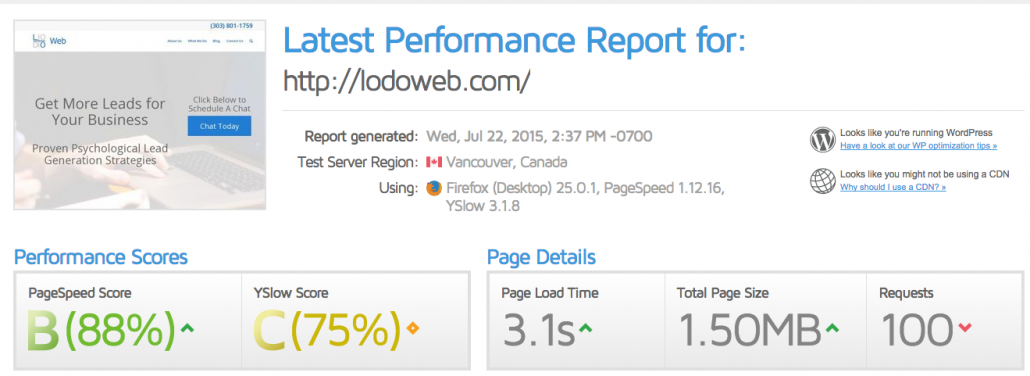
How fast should your site load? The faster the better, there really isn’t much of a benchmark here. In this case, LoDoWeb.com loads 88% faster than all other websites on the web. That’s pretty solid. The tool that I use to determine site speed is called GTMetrix. This will help you analyze how fast or how slow your site loads compared to the rest of what’s out there. There are certain things, like caching, that can help increase load time, without upgrading your server. Upgrading your server is another way to increase the speed of the site, after all, the site is only as good as the host.

In general, site speed and reduced load time will help improve your rank. The faster the better.

LAW 13: URL CONTENT

Ever heard of Google Sniping? It’s a technique in which you find a keyword you want to rank on and include it everywhere in the site. Let’s say you are trying to rank for “How to Rank on Google”. You would begin by purchasing the domain “HowtoRankOnGoogle.com” and proceed by building out a niche site focused entirely on one keyword. This is a crude example of including information in your links.
Cursor_and_Edit_Post_‹_LoDo_Web_—_WordPressNow, the root domain doesn’t have a whole lot of authority by itself. It does need to be built and optimized. However, the other URLs have a significant impact on rank. That would be every other domain after the root domain. What I’m referring to here is called the permalink. Assuming you did your keyword research correctly, it’s wise to include the keyword in the permalink.

Including the keyword in the permalink and matching that permalink to the page title and to the keyword itself. This will help the search engines identify what your content will be about before even crawling it. This gives a good indication to the crawler, the reader and you. It may seem trivial, but I see this quite a bit where the permalink has nothing to do with the content on the page.

LAW 14: SECURITY

How secure is your site? Hopefully enough to prevent intruders. However, what I’m referring to here is whether or not your site has a Security Socket Layer (SSL) installed. Godaddy_SSL_ExampleThis gives the “https”, instead of the standard “http” request. An SSL is essentially a certificate of trust between two servers. You usually purchase them and it tells your visitors how “official” you are as a website. With any data that is transferred on your site, it is first encrypted and then sent to the recipient.
SSL is critical for any transactional based websites, like ecommerce. You must have an SSL if you are selling goods online because you are accepting credit cards. During the transaction, there is a chance that the credit card information can be compromised because of your lack of security.

Having an SSL on your server communicates to your visitors and to the search engines that you are a serious company and take your security and encryption of user information seriously. More link juice to you!

LAW 15: PERMALINK STRUCTURE

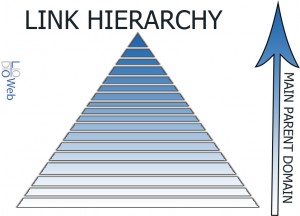
Link_Hierarchy_Example_LoDo_WebHave you ever visit a site and admire how organized everything is? How every page fits into the other one and it flows quite nicely? This is because of an organized permalink structure. The permalink structure, link structure, or link schema represents the relationship of all your links as compared to the sub pages before them. This goes all the way up to the home page. This has an indication of the overall structure and the actual hierarchical relationship of your links compared to the rest of the links on the site. Now, this is isn’t internal linking, but more so the structured organization of your site. All sites should maintain a hierarchy from the home page and then the parent page and the child page and so on and so on.

The correct nesting or hierarchy strategy can help navigate both your visitors and the crawlers. Essentially, you want to have your link structured like a pyramid, with the largest parent page above each child page. A link structure could look something like this: http://www.YOURWEBSITE.com/Parent_Page/Child_Page/Child_Child_Page/Child_Child_Child_Page/etc. As you can see here, there is a clear hierarchy established in relationship to the home page.

Let’s take another look. If you look at LoDo Web’s Full Scale Implementation Page for example, you can see: http://lodoweb.com/what-we-do/full-scale-implementation/. The lodoweb.com portion is the parent page, or home page. The what-we-do portion is the child to the home page and contains all the information about what we do in summary. The full-scale-implementation portion is the child to the what-we-do page and contains more details about what we do, but more specifically the design, development and on page SEO in one bundle. The further you go down into the link hierarchy, or the further you go away from the home page, the more detailed each page gets.  

It is important to keep the detailed pages far down the link hierarchy, if they reference the parent page before it. This helps create a logical direction for the link structure of your website. The search engines and humans will know, going back in direction of the link structure should offer them less details than the previous page and perhaps a broader overall view.

This is especially important when dealing with e-commerce. You want to ensure that the product is at the end of all the categories so that the user can go backwards to broader and broader categories, eventually leading back to the home page. Permalink structure goes hand in hand with breadcrumbs.

LAW 16: BREADCRUMBS

Breadcrumbs_LoDo_WebWho’s getting hungry? Who knew we would be talking about food in an article about SEO?


I hate to be the bearer of bad news, but there is no bread in SEO. There are no breadcrumbs to eat. These virtual breadcrumbs represent the location of the user in relation to your site.

Just like Hansel and Gretel left their trail of breadcrumbs in the woods so they can find their way home, the breadcrumbs on your site leave a trail for the visitors so can always find a way back home.

Here’s the important thing, the breadcrumbs should mimic your permalink structure so that the visitor and the crawler know exactly where they are on your site. How_to_Rank_on_Google_Part_2___LoDo_Web

See? you know exactly where you are on the site. You can backtrack and see all the articles associated with each category and eventually find your way back to the homepage. Both the breadcrumbs and permalink structures should be identical in character lengths. They are mirror images, one is the actual link, and the other is used for the navigation of that link. What we are doing with all this site architecture is providing a map and compass to all visitors who are on the site. It gives them direction and relational location on your site.

LAW 17: SOCIAL MEDIA INTEGRATION

With so many social media channels out there, some that you’ve heard of, some that you haven’t it is enough to make you sick. There are literally hundreds of social media channels out there that can be integrated on your site. From feeds to widgets, the integrations are literally endless. I’m sure you’ve heard of the standard: Facebook, Twitter, LinkedIn, YouTube, Google+, Pinterest. These are by far the most popular channels out there, but there are more that you are probably not aware of. No, I’m Social_Media_Diagram_LoDo_Webnot suggesting to start using all of them. You should certainly have accounts with the main ones, but not all of them. It is a business and personal decision which accounts to have.

In any case, your website should be the centralized hub for all these channels. All search engines need to know that your website is the host for all of these social media channels, regardless of how many you have.

All your social media accounts should be linked to your website so that anybody can find access them through the site. This also shows the search engines that all these accounts are linked under one brand name. There is no point in having all these loose accounts dangling around the web, without any linking.

Like a wheel, your website should b at the center of the wheel, with each social media account acting a spoke to the center point on the wheel. Additional to linking each one of these social media accounts externally, linking all your social media accounts with a link to your website in the description, or somewhere on the account, would provide the necessary understanding for search engines to see your website as a higher authority than any of the individual social media accounts.

See social media accounts as an additional outlet of information from your website. Social media is a place where things get shared, and things should originate from your site. Of course, you can always build content on the social media accounts and reference it on your site, but it’s always nice to have everything in once place.

LAW 18: INTERNAL LINKING

Just like external linking, part of Off Page SEO, internal linking offers a way for the search engines to gauge the level of importance in pages. The more links to a particular page on your site, the more it will have perceived importance in ranking. Think about it as internal link juice or link power. Each internal link to another page on your site offers the search engines another way to let them know what you think is the most important pages on your site. Referencing previous articles, or other pages on your site helps the search engines, and your visitors, logically connect your website. It’s like your own internal web within your website.

Google_Webmaster_Tools_Internal_Linking_LoDo_WebAgain, Google has found this important enough to include it in their webmaster tools. This is clear that they find it important enough and you should too. If you ever notice any successful blogs or site, they are always referencing previous posts or pages that already exist on their site. Likewise, each additional link to the site shows the level of importance to the link referenced. Eventually, if you break out your site into the whats linking to what, you’ll see it’ll resemble a web. This web is how search engines can gauge the level of perceived internal authority of individual pages on your site.

LAW 19: CLOAKING

Cloak_LoDo_Web_How_To_Rank_On_Google

There is so much magic in how to rank on Google. From crystal balls, to cloaks. Wait….we aren’t talking about the same thing here. We’re not talking about the cloak that you would put on yourself when you go fetch a pail of water or get milk from the farm. What we’re talking about here is a concept called link cloaking.

Link cloaking is a blackhat method of SEO that shows one link to the search engines and another to the visitors. Often times, the compliant link is shown to the search engines, and a non compliant, sometimes even downright inappropriate link is shown to the actual visitors.

This is accomplished by using a software to identify the IPs of the crawlers and redirect them to a completely different page, whilst your users go to the page you want them to see. This is seen a lot of times in the affiliate world and is a prominent technique in blackhat SEO. Doing this is basically trying to beat the search engine at their own game by giving them a fake page to crawl and therefore rank higher up. When the search engines find out, and they will, your risk your entire IP to get blacklisted on Google and ruin any legitimate reputation you may have had. Recovering from a blacklisted IP on Google is nearly impossible and is often permanent.

But wait, you’re saying you would never attempt something like this because why would you risk your legitimate business on a blackhat technique? Let’s say you have a page 1 rank in Google and you’ve worked your butt off to get there. And let’s just say that you don’t have the right security installed on your site. If a hacker is able to brute force his or her way into your site, you may be in trouble. Once they gain access, they can install a script that would redirect all bot traffic elsewhere and any real visitor traffic to a page of their choosing.

Often times this is a non-compliant page in the eyes of Google. Because they are not the site admin, it doesn’t matter what happens to the IP or reputation of the domain. They are in it for quick cash. By the time you or Google finds out, it’s often to late and they have already done the damage to your reputation. That’s why it’s so important to have good security measures in place on your site.

What else do you want to know about site architecture?

How to Rank on Google Part 1

Difference Between Black Hat White Hat Grey Hat

Black Hat White Hat Grey HatWhat is the Difference Between Black Hat White Hat and Grey Hat?

The difference between the three schools of thought and practice is pretty much black and white and one of them is a gray area. In general all of these hats typically refer to hacking and methodologies of hacking. However, they can also be applying to the methodologies and strategies of traffic generation. This includes SEO, PPC, Inbound Marketing, Email marketing, social media marketing and any other method that generate traffic.

In the most classic computer geek fashion, there is a light side, and there is a dark side. What side will you choose? The force is strong with this one. Below a description of each school of thought and practice.

Black Hat

Black hat can mean a whole slew of different things. Black hat can be hacking, traffic generation, spam and search engine optimization. You hear this term thrown around quite a lot in the online world. In general, Black hat strategies are considered non-compliant and frowned upon. These strategies are essentially not compliant and not allowed in the online world. Some of them, like cloaking, can get you banned on ad networks and other social sites. If you abuse the system, eventually you’ll lose. Now, black hat hacking is a bit different. Black hat hacking is hacking with a malicious intent. I’m not going to go into this today.

In this capacity I am referring to Black Hat methods of Search Engine Optimization. These are considered non-compliant Google ranking strategies to get your site ranked. Google battles many of these strategies on a daily basis to help prevent manipulation of the search results They may work in the short term, but in the long term they will eventually fail as Google updates their algorithm.

Some of these strategies may include

  • Forced Backlinks
  • Comment Spamming
  • Email Spamming
  • URL Cloaking
  • DNS Spoofing
  • IP Spoofing

White Hat

White hat strategies are exactly the opposite of black hat. White hat strategies are considered compliant strategies by most organization. Indeed, much like Black hat hacking is for malicious purposes, White hat hacking is for the greater good. The goal of this is to find security vulnerabilities and patch them. This helps keep a company’s network safe.

In regards to the Search Engine Optimization, these strategies, though not immediate, over time get you ranked on Google. Utilizing these methods will get you on the good side of Google and eventually reaping the rewards of organic ranking on the search engines.

White hat Search Engine Optimization strategies can include

  • Site architecture
  • Link Hierarchy
  • Content Development
  • Internal linking
  • Relevant backlinking
  • Opt-in List building
  • On Page SEO

These strategies are really designated to be long term. For the most part, this is what you want to be focusing a lot of your time on. White hat techniques take a bit more patience and persistence, but over time get you the best possible foot hold in your little online space.

Grey Hat

Grey hat is neither here nor there. Some would consider it acceptable, for example, purchasing likes on Facebook. Whereas others would consider it shady practice. For the most part, Grey Hat is a mixture of white hat and black hat techniques. If there is a question about the validity of the practice, it would probably be considered non compliant in most search engines. The reasoning for this is that if you have to question what you are doing to generate traffic, or passively trying to hack into other networks “for fun” it’s still considered malicious. If the practice is in question, it should simply be avoided.

This territory is not very clearly defined and the definitions of what the activities are vary from person to person.

White Hat Strategies Win Out

In terms of traffic generation, the best practice to implement is white hat SEO strategies. The practices are truly involved and take a longer time, but because of this they also last longer creating an asset rather than a risk for a small business. If a particular ranking strategy is working for you, and its considered “ok” by the search engines, then most likely you are fine.

Often times you know you are doing something wrong when you have to start hiding your tracks or registering with a VPN. These sorts of activities present a huge risk for you and your business. Would you risk your site rank, or rather build a business on a spammy practice? What asset are you left with in the end besides the cash? There is nothing to fall back on and considering the fact that agencies have full awareness of what happens on the internet, it will eventually turn people’s heads. You will get caught.

If you are trying to build an asset and long term future for your business, it’s important to stay within the boundaries of Google’s parameters. Since more than 80% of your search volume will come from Google, it’s wise to stay on the good side of the search engine and avoid strategies to manipulate the results. Eventually you’ll lose against them.

Everything we do with our existing site is done so with White Hat strategies. Primarily, it’s all about delivering good, informative and rich content that helps your visitors receive exactly what they are searching for. Ever search for a result and Google practically predicted it? Sometimes it’s creepy, but the search engines are getting very smart with the algorithms. Undoubtably they will change again and if you are a legitimate business, you’ll have nothing to worry about.

What other white hat techniques do you know of that help get you ranked? Please comment below 🙂


How to Add SEO Meta to Post Categories

You have Yoast SEO installed on your WordPress, and you are adding in SEO Titles and SEO Descriptions for all your Posts and Pages and getting that Green light with your Yoast SEO Check: LoDo_Web_SEO Check Good


This is good news! But, did you know there is an SEO option for your post categories as well? You should be adding SEO Meta to Post Categories to help increase your rank even further.

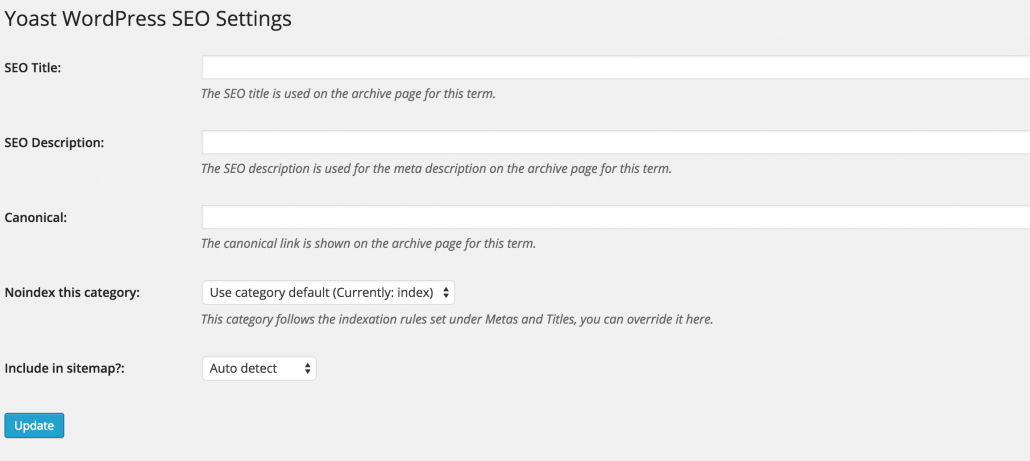
If your post categories are included in your SiteMap, which by default they are, then your categories are also being indexed by the major search engines, this includes Google. So when Google crawls your site and sees your categories’ empty meta information, it simply doesn’t help your rank. You can chose how you want your post categories to appear, but this gives you yet another opportunity to rank with your SEO settings.

You go about this the same way you would with your Post/Page SEO content, you just have to actually do it! Don’t forget getting your Post Categories all SEO’d up as it gives you another opportunity for Google to index more of your pages.

Here’s how you do it:

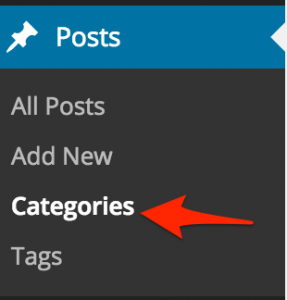
1. Click on Posts–>Categories: LoDo_Web_SEO Meta to post categories Categories

2. Click on Edit for the post category you want to edit:LoDo_Web_SEO Meta to post categories Edit
3. You’ll see this next screen: LoDo_Web_Edit_Category_WordPress
Much like editing your post content, your post categories can be pulled in Google Search Results so it is important to index them appropriately with the correct SEO Title, SEO Description, Canonical URL(if applicable) and additional specs. You can also leave this out of your sitemap entirely.
If you don’t plan on doing this, simply remove the post categories from being indexed, and/or remove it from the sitemap.xml file.
What is your experience with doing this?